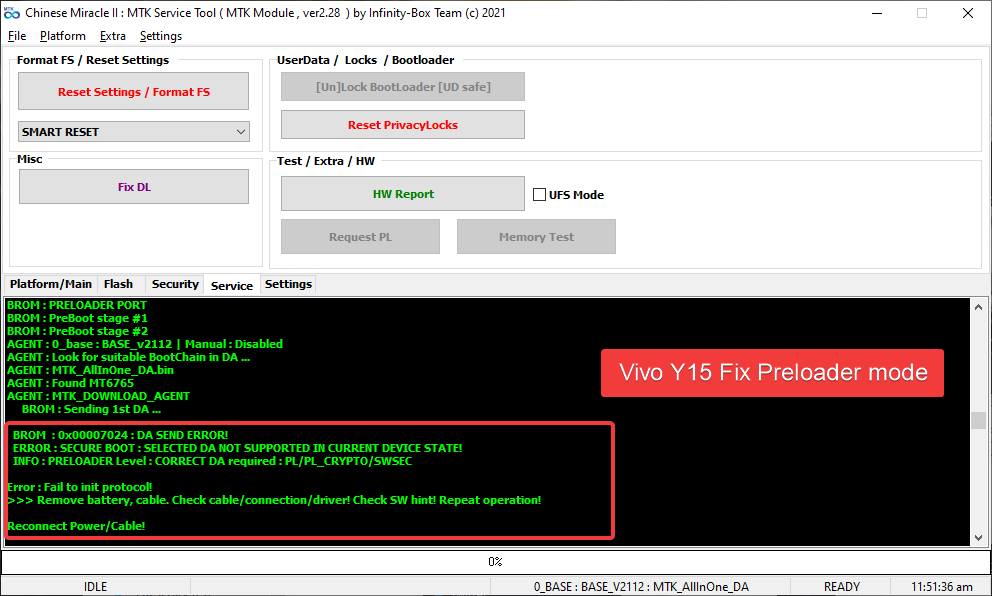
Vivo Added new security and block BROM mode from the preloader. But You can Fix this via the New Test point to boot to BROM Mode. How to format Vivo Y15 1901 using CM2, UMT, Hydra, Unlock Tool, or any other professional tool. This method is tricky and professional and You need to disassemble the phone.
vivo y15 edl point
vivo y15 test point umt
unlock tool
vivo y15 pattern unlock umt
INFO : PRELOADER Level : CORRECT DA required : PL/PL_CRYPTO/SWSEC
Vivo Y15 is MediaTek Based phone and can easily be formatted by Tools until Vivo released a New security patch to disable BROM mode from their MediaTek phones. If You have forgotten the password You can not recover it without erasing Userdata using BROM mode.
Warning!!
This method is Risky sometimes so be careful while dissembling and connecting with test point.
How to Hard Reset Vivo Y15 1901 New Security
- First of all, install CM2MT2 latest version and Mediatek drivers with LibUSB Filter(installed with CM2 Setup)
- Power Off and Disassemble the phone and remove the shield and clean the test point

- Open CM2MT2 and Do not select any model or DA just Open the “Service” tab and select “SMART RESET” and Click on Reset Settings / Format FS
- Connect Test Point with GND and then insert USB Cable.
- This Test Point will Take Vivo Y15 to BROM mode and CM2 or UMT can Format this to remove Pattern/Pin or Password.
Mode : SMART RESET

1. Make sure device is powered off. Power off, if need. Wait 20 seconds after
2. Insert USB cable in phone
Waiting for device connection ...

PTFN : MediaTek USB Port_V1632 (COM8)
MODE : BOOTROM
PORT : 8
Waiting BOOT ack ...
BROM : Skip ACK verify
BROM : Init BROM
BROM init passed!
     CHIP : MT6765 , SBID : 0x8A00 , HWVR : 0xCA00 , SWVR : 0x0000
     CODE : Cervino
     TYPE : MODERN [RAPHAEL]
BROM : MEID : 232FAD20EFEF9B671B459548538651FD
BROM : SecLevel : 0x000000E5
BROM : SecMode  : SBC+SDA+EXT
BROM : BROM|BL  : 0x05|0xFE
BROM : BOOTROM
BROM : SOCID : 0B0078ECC0762AFACA88A9818EF2229B9FDA8A8F913C34FCF594132A02AA860E
BROM : SLA : Local Auth
BROM : SLA : Auth Started!
BROM : SLA : Auth Passed!
BROM : SLA : 0x0000001F
BROM : PreBoot stage #1
BROM : PreBoot stage #2
AGENT : 0_base : BASE_v2112 | Manual : Disabled
AGENT : Look for suitable BootChain in DA ...
AGENT : MTK_AllInOne_DA.bin
AGENT : Found MT6765
AGENT : MTK_DOWNLOAD_AGENT
     BROM : Sending 1st DA ...
BROM : DA sent
BROM :Transfer control to DA ...
     DA : AGENT started!
DA : SYNC
     DA : MODE : BROM
DA : EXT_RAM NOT initialized!
     EMI : DEV : INFINITY
     EMI : SRC : PRELOADER_INFINITY_0
     EMI : CNT : 0003
     EMI : Init EMI from INTERNAL DB
     EMI : EXT_RAM CFG Passed!
DA : BOOT to 2nd DA ...
DA : 2ND stage confirmed!
DA : SYNC with DA passed!
DA : Receiving HW info

        SRAM: 0x0003A000 [ 232.00 KB ]
        DRAM: 0x100000000 [ 4.00 GB ]

        EMMC: CID : 90014A6843396150330142EBE0FCC61F
        EMMC: VEN : HYNIX : OEM : 74 : ID : 684339615033
        EMMC: VEN : HYNIX : hC9aP3
        EMMC: SNN : 1122754812 ( 0x42EBE0FC) , MF : 12/2019

        EMMC:
              BOOT1  : 0x00400000 [ 4.00 MB ]
              BOOT2  : 0x00400000 [ 4.00 MB ]
              RPMB   : 0x01000000 [ 16.00 MB ]
              USER   : 0xE8F800000 [ 58.24 GB ]

        CHIP : MT6765 , SBID : 0x8A00 , HWVR : 0xCA00 , SWVR : 0x0000 , EVOL : 0x0000

        RNID : C902C8F89656C71CB4FA019053E54D93

DA : USB : HIGH-SPEED

Boot done!

SmartInfo : 0x835757

Format Ok : RESET PROTECTION
Format Ok : USERDATA
Format Ok : CACHE
Format Ok : USERDATA

Done!
Elapsed: 00:00:43

Reconnect Power/Cable!